// NOTE 002
Start a project without losing the first week: Next.js, Supabase, GitHub and Vercel
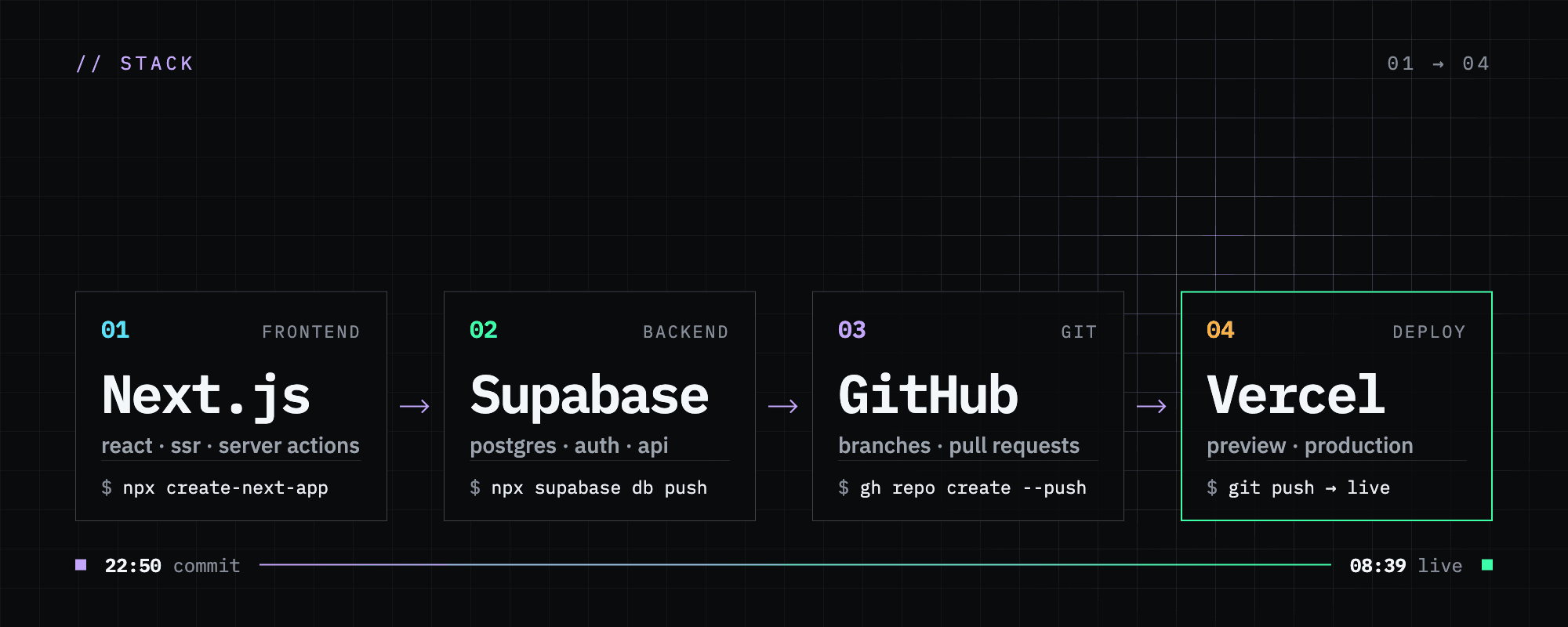
To launch a project fast, I don’t code a backend: Supabase gives the database, auth and API, Next.js handles the frontend, GitHub keeps the history and Vercel publishes every push. Four choices made once, free to start, that still hold when the project grows.
On this page 8 sections
› section 1 / 8
Hesitation costs more than code
At the start of a project, it’s tempting to pick everything with care: the framework, the database, the hosting, how accounts work. You compare, read reviews, and write an API and a login system before you have shown a single screen to anyone. A week goes by and the project still isn’t online.
My view: make these choices once, then reuse them on every new project. I use the same stack wherever I can:
| Role | Tool | What you don’t have to build |
|---|---|---|
| Backend | Supabase | Postgres database, auth, file storage, an API generated from your tables |
| Frontend | Next.js | Routing, server rendering, small server functions for sensitive logic |
| Versioning | GitHub | History, branches, code review through pull requests |
| Publishing | Vercel | A deployment on every push, a preview URL per branch, HTTPS, custom domain |
All four have a free tier big enough to launch a project, and none of them makes you rewrite everything the day users show up.
This site is built this way
ossama.ma runs on this stack. The first commit is from 6 October 2026 at 22:50: Next.js, the three languages (English, French, Arabic), the Supabase schema and seed data. Fifteen minutes later the README had its GitHub + Vercel deployment section. At 08:39 the next morning, the public site followed.
Since then the database has grown to 14 migrations, and a backoffice with two-factor authentication runs on its own subdomain, admin.ossama.ma. I didn’t have to write a separate API server.
The backend: Supabase
Supabase is a PostgreSQL database wrapped in what a backend usually does: sign-up and login (email, Google, GitHub…), file storage, and a REST API generated from your tables. Create a projects table and the frontend reads it in a few lines:
const { data, error } = await supabase
  .from("projects")
  .select("id, title, published_at")
  .eq("status", "published");
The thing to understand on day one is security. The frontend uses a public key that anyone can see in the browser. Your data is protected by Row Level Security (RLS) rules, written in SQL on each table: who can read which rows, who can write.
alter table projects enable row level security;

create policy "public read of published projects"
  on projects for select
  using (status = 'published');
! WARNING
A table without RLS can be read and changed by anyone who has the public key, which means every visitor to your site. Turn RLS on for each table when you create it, then open only what needs to be open.
Keep the schema in SQL migration files in the repo instead of clicking around the dashboard. The database is then versioned like the code, and you can recreate it exactly on a second project: a test environment, a client, another region.
The frontend: Next.js
Next.js handles pages, routing and server rendering, which gives fast pages that Google indexes well. It also brings a small server side with Server Actions and Route Handlers. That is where logic goes that must not run in the browser, such as a call with the Supabase secret key or sending an email.
One repo and one language, TypeScript, cover the interface and the little server code a project needs at the start. The supabase gen types typescript command generates types for your tables, so the editor flags a misspelled column before you even run the site.
Versioning and publishing: GitHub and Vercel
GitHub keeps the history. Vercel connects to the repo and publishes on every push, with no server to set up. My workflow fits in two branches:
develop: every push gets a Vercel preview URL. I check the result on a real link, phone included.main: production. Changes arrive through a pull request fromdevelop, and the merge puts them live. If a release breaks something, Vercel lets you roll back to the previous deployment while you fix it.
› TIP
Put your Vercel functions in the same region as your Supabase database. This site uses dub1 (Dublin) for a database in eu-west-1 (Ireland), so every database call stays in one region.
The first evening, command by command
# 1. The frontend (create-next-app also creates the Git repo and a first commit)
npx create-next-app@latest my-project
cd my-project

# 2. The Supabase client
npm install @supabase/supabase-js @supabase/ssr

# 3. A versioned schema
npx supabase init
npx supabase migration new init

# 4. The GitHub repo
git add . && git commit -m "Supabase setup"
gh repo create my-project --private --source=. --push
Then:
- Create a project on Supabase and copy its URL and public key.
- Write your tables in the migration file, then apply it with
npx supabase linkandnpx supabase db push. - On Vercel, import the GitHub repo.
- Add the
NEXT_PUBLIC_SUPABASE_URLandNEXT_PUBLIC_SUPABASE_PUBLISHABLE_KEYenvironment variables, then deploy. The site is online with HTTPS, a database and auth ready to wire up. The rest of your time goes to the first feature.
What free gets you, and where it stops
Figures taken in October 2026 from the official Supabase and Vercel pages:
| Supabase Free | Vercel Hobby | |
|---|---|---|
| Projects | 2 active projects | 200 projects |
| Data | 500 MB database, 1 GB files | 100 GB transfer per month |
| Users and requests | 50,000 monthly active users | 1 million function invocations per month |
| Good to know | Paused after one week without activity, no automatic backups | Personal, non-commercial use only |
| Paid plan | Pro from $25 per month | Pro at $20 per user per month |
! WARNING
A client project, or a product that makes money, falls outside Vercel Hobby. Move to Vercel Pro as soon as the project is commercial, and to Supabase Pro as soon as the data matters, for daily backups and to stop the pausing.
Growing without a rewrite
When the project takes off, the stack stays the same and only the plans change: Supabase Pro and then a bigger compute instance, Vercel Pro, a custom domain. The code stays where it is. The same Supabase database can also serve a React Native mobile app through the same supabase-js client.
Lock-in is smaller than it looks. Supabase is standard PostgreSQL: one pg_dump exports the whole database to any other Postgres host. Next.js also runs on your own Node.js server or in a Docker container if Vercel stops fitting. The GitHub repo stays yours whatever happens.
The stack does have one clear limit. A Vercel function stops after 300 seconds on the free plan, so long jobs (importing large files, generating reports, a task queue) will need a separate worker. For an MVP, a website, an internal tool or an app with a few thousand users, that limit comes late.